Bulbs, Bloom and Budget: Coding a Piccadilly Marquee That Glows Without Melting the GPU
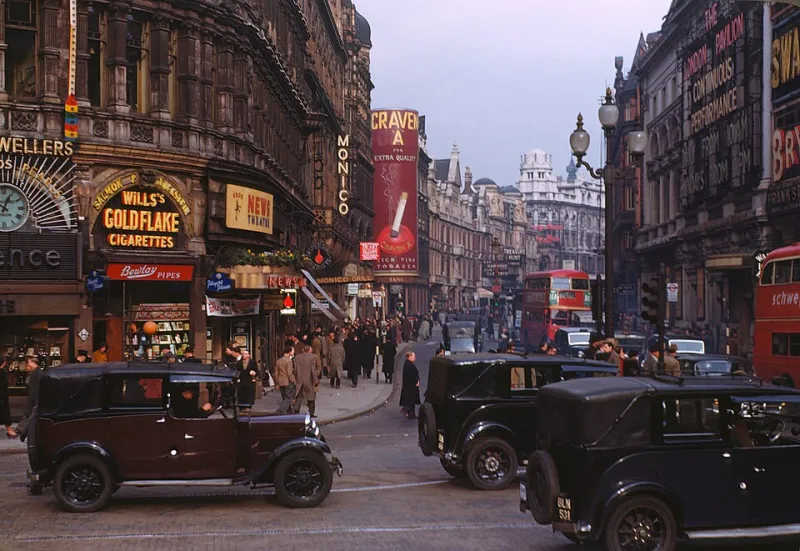
Photo: Chalmers Butterfield, CC BY 2.5, via Wikimedia Commons
West End marquees are not really signage. They are weather: a warm, flickering frontage that changes how the pavement feels. Recreating that in WebGL is tempting because it looks like a lighting problem. It is also a performance and accessibility problem wearing a sparkly jacket. This build keeps the glamour and keeps the frame budget.
Begin with colour temperature, not sparkle
Pure white bulbs are a tell. Most older London theatre fronts read warmer than a phone screen wants to admit: tungsten-ish, somewhere around 2700K, with a hot centre and amber fall-off. In shader terms, start with a cream core and let additive blending do the halo. Use a base like #ffd7a3, then push toward #fff3d6 only at the brightest point. Additive blending is lovely because overlapping bulbs bloom naturally, but it also means you must clamp exposure. A tone-mapped renderer and a restrained emissive value will stop the sign becoming a white rectangle.
One bulb, a thousand times
Build one low-poly bulb and instance it. A sphere with eight or twelve segments is plenty; nobody is inspecting your geometry from the stalls. Use InstancedMesh with per-instance colour, phase and a failure flag. The choreography is then a set of cheap functions: a travelling sine wave for the chase, a slower pulse for the surround, and a seeded random offset so the whole thing never feels like a metronome. For a Piccadilly-style frontage I would budget 800 to 1,200 bulbs. More than that and you are rendering a light show for the GPU, not the street.
const bulbCount = 1000;
const geo = new THREE.SphereGeometry(0.055, 10, 8);
const mat = new THREE.MeshBasicMaterial({ blending: THREE.AdditiveBlending, transparent: true, depthWrite: false });
const bulbs = new THREE.InstancedMesh(geo, mat, bulbCount);
const dummy = new THREE.Object3D();
const phases = new Float32Array(bulbCount);
const failures = new Uint8Array(bulbCount);

for (let i = 0; i < bulbCount; i++) {
  dummy.position.set(x, y, z);
  dummy.updateMatrix();
  bulbs.setMatrixAt(i, dummy.matrix);
  phases[i] = Math.random() * Math.PI * 2;
  failures[i] = Math.random() < 0.035 ? 1 : 0;
}
Make failure feel human
Dead bulbs are the difference between a render and a place. But do not call Math.random every frame. Precompute failures and flicker seeds at setup, then animate from time. A bulb can be fully dead, dim, or stuttering on a slow schedule. Keep the dead proportion low: two to four per cent reads as maintenance, ten per cent reads as a closure notice. If you want a chase, give each bulb a phase offset based on its column and row, not its index, so the pattern follows the architecture.
Respect the reduced-motion setting
Marquee animation is exactly the sort of thing that should check prefers-reduced-motion. When it is set, render one warm, evenly lit frame and stop the loop. Keep the sign legible: no strobing, no chase, no random flicker. This is not a downgrade; it is the poster version. Use a CSS fallback for the surrounding page, too, so the section still reads if WebGL fails or the user has blocked it. In testing, tab through the page and make sure the canvas is not the only place where the venue name appears.
Set the budget before the build
Set a performance budget: 60fps on a mid-range laptop, no more than 1.5 device pixel ratio, no shadows, no post-processing bloom on mobile. Pause rendering when the canvas leaves the viewport with IntersectionObserver. Cap the canvas size and listen for visibilitychange. Additive blending can get expensive at high resolution, so render at a slightly lower scale and upscale with CSS. If the frame time slips, reduce bulb count before you reduce colour quality; the warmth matters more than the density.
A CodePen-sized starting point
Here is the skeleton I would take into a portfolio demo. It assumes Three.js is loaded, and it stops short of the HTML chrome so you can wrap it in your own layout.
const scene = new THREE.Scene();
const camera = new THREE.PerspectiveCamera(35, innerWidth / innerHeight, 0.1, 100);
camera.position.set(0, 0, 8);
const renderer = new THREE.WebGLRenderer({ antialias: true, alpha: true });
renderer.setPixelRatio(Math.min(devicePixelRatio, 1.5));
renderer.setSize(innerWidth, innerHeight);
document.querySelector('#marquee').appendChild(renderer.domElement);

const clock = new THREE.Clock();
const reduce = matchMedia('(prefers-reduced-motion: reduce)');

function frame() {
  const t = reduce.matches ? 0 : clock.getElapsedTime();
  for (let i = 0; i < bulbCount; i++) {
    const pulse = failures[i] ? 0 : 0.55 + 0.45 * Math.sin(t * 2 + phases[i]);
    bulbs.setColorAt(i, new THREE.Color().setRGB(1, 0.72 + pulse * 0.16, 0.42 + pulse * 0.2));
  }
  bulbs.instanceColor.needsUpdate = true;
  renderer.render(scene, camera);
  if (!reduce.matches) requestAnimationFrame(frame);
}
frame();
Polish for a UK portfolio
Give it a real venue name, but keep it fictional or cleared for use. Add a short case note explaining the colour-temperature choice, the failure rate and the reduced-motion behaviour. That note is what turns a shiny toy into a portfolio piece. UK makers are competing for client work where accessibility is not optional, so show that you thought about the person standing in the cold, not just the person taking the screenshot.